Introduction
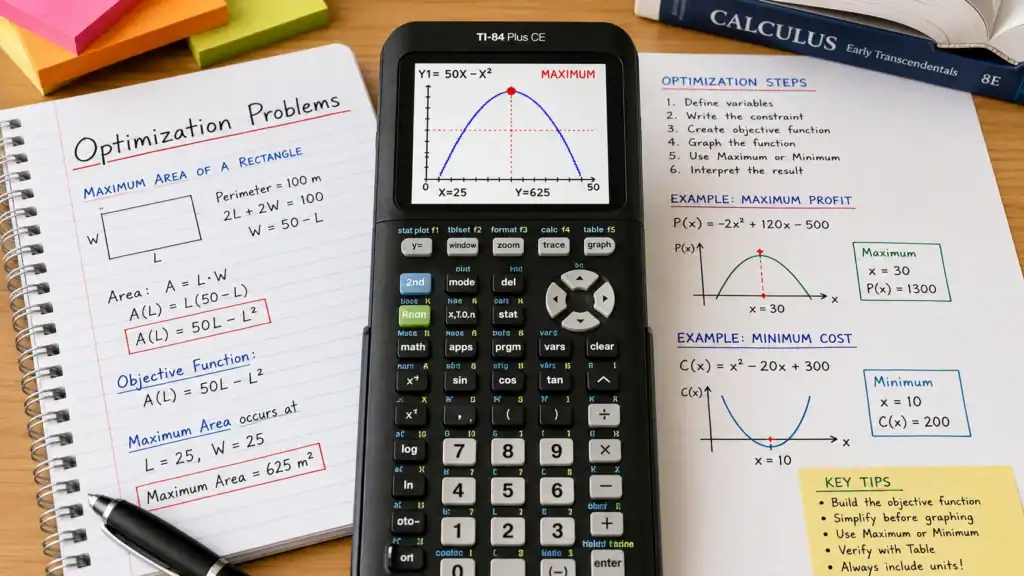
Optimization problems are among the most practical and frequently tested applications of calculus and algebra. They require you to find the greatest or least possible value of a quantity under specific constraints — such as maximizing profit, maximizing enclosed volume or area, minimizing material costs, or minimizing travel time.
While optimization can be solved algebraically using derivatives, the TI-84 calculator dramatically accelerates the process by graphing objective functions and locating exact maximum and minimum coordinates. Practice these problems directly on our free browser-based TI-84 Calculator Online.
Solve Optimization Problems Online
Graph your objective functions and pinpoint maximum profit or minimum cost coordinates instantly on our online TI-84 simulator.
The 6-Step Optimization Framework
- Identify Variables: Clearly define what you are optimizing (e.g. (A) for Area, (P) for Profit) and your independent variable (e.g. (x)).
- Write the Constraint Equation: Formulate the equation representing physical limitations (e.g. total fencing perimeter or material budget).
- Formulate the Objective Function: Express the quantity to be optimized in terms of a single variable.
- Graph on the TI-84: Enter the objective function into
[Y=]and press[GRAPH]. - Find Extrema: Use
[2ND]+[TRACE]>4:maximumor3:minimumto calculate the critical vertex. - Interpret Results: State your answer with appropriate units in the context of the question.
Worked Example 1: Maximum Enclosed Area
Problem: A farmer has 100 meters of fencing to build a rectangular pasture. What dimensions produce the maximum area?
- Constraint: Perimeter (2L + 2W = 100 implies W = 50 – L).
- Objective Function: (text{Area} = L times W = L(50 – L) = 50L – L^2).
- Calculator Steps:
- Press
[Y=]and enter50X - X²intoY1. - Press
[WINDOW]: SetXmin = 0,Xmax = 50,Ymin = 0,Ymax = 700. - Press
[GRAPH]. - Press
[2ND]>[TRACE]>4:maximum. - Select Left Bound at (x = 20), Right Bound at (x = 30), and press
[ENTER]on Guess.
- Press
- Result: (X = 25, Y = 625). The maximum area is 625 m² with dimensions 25 m × 25 m (a perfect square).
Worked Example 2: Maximum Business Profit
Problem: A company’s profit in dollars is modeled by (P(x) = -2x^2 + 120x – 500), where (x) is units sold. Find maximum profit.
- Enter
-2X² + 120X - 500into[Y=]. - Press
[2ND]>[TRACE]>4:maximum. - Set bounds around the curve’s peak.
- Result: (X = 30, Y = 1300). Maximum profit is $1,300 achieved when selling 30 units.
Common Mistakes to Avoid
- Graphing the Constraint Instead of the Objective: Always graph the function you want to maximize or minimize (Profit, Area, Cost), not the perimeter or constraint equation.
- Window Bounds Too Narrow: If the peak isn’t visible, press
[ZOOM]>0:ZoomFitor manually increaseYmaxin[WINDOW]. - Forgetting to State Both Dimensions: Remember that (x) gives the dimension, and (y) gives the optimal area/profit. Read the question carefully to provide what is asked.
Frequently Asked Questions
Can I verify optimization results using table values?
Yes. Press [2ND] > [GRAPH] to view the numerical table. The peak value will have smaller outputs on both sides. Also review our guide on Finding Maximum & Minimum Values.
Summary
The TI-84 turns complex calculus optimization into an intuitive, visual workflow. Practice formulating and solving optimization models today on the live TI-84 simulator!

Dr. Vivienne Blackwell is a mathematics and educational technology specialist focused on TI-84 calculator online tools, graphing calculator simulations, algebra, calculus, and statistics problem-solving systems. She creates structured and optimised guides that explain how to use TI-84 emulators and online calculator platforms for accurate equation solving, function graphing, and exam-focused mathematical analysis.